
One workflow from topic to published article
From idea to live post, with no manual work.
See how we used n8n to draft articles with AI, format them for SEO, schedule them and publish on time, so new content goes live every day without anyone touching it.
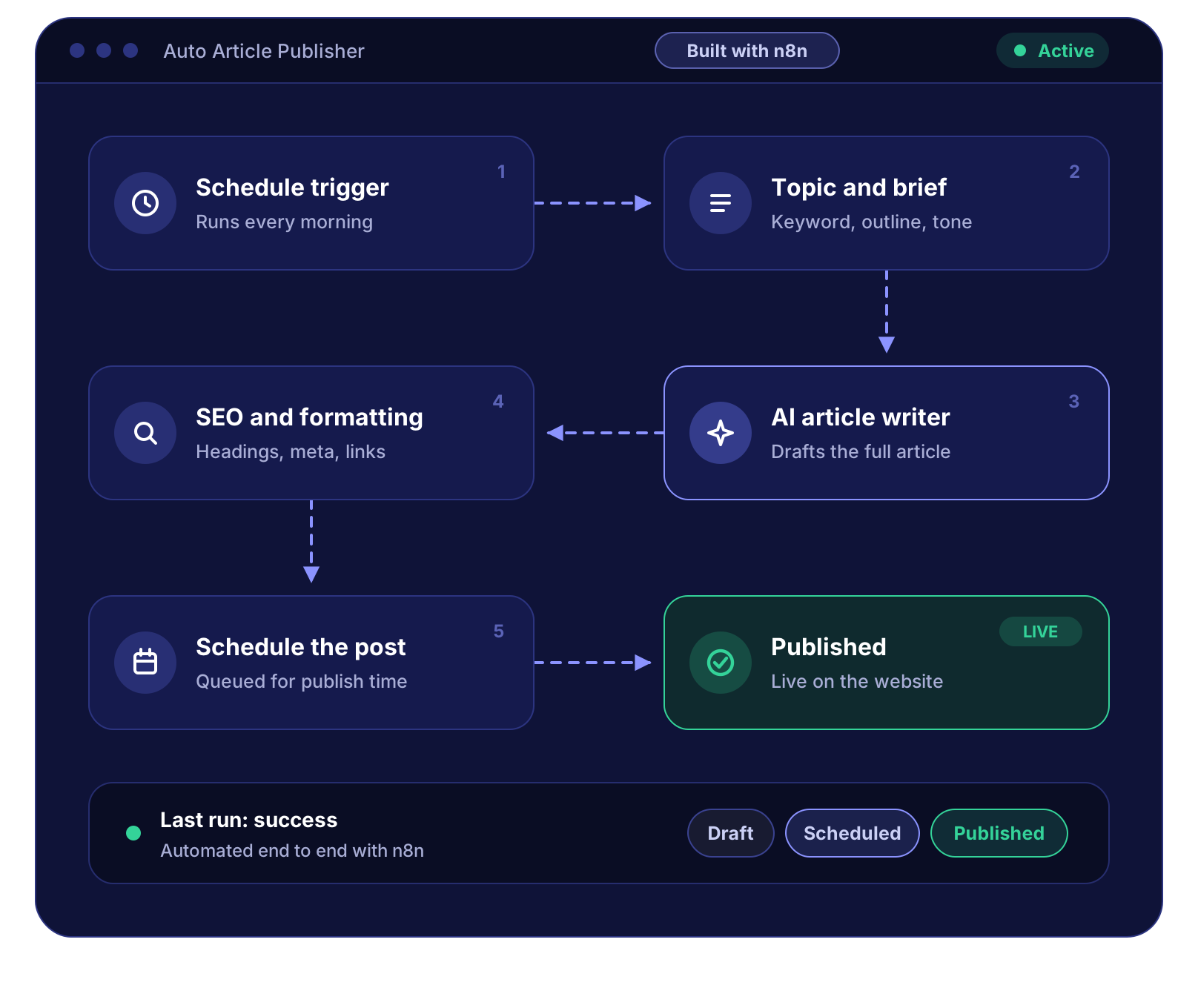
An editorial pipeline that writes, schedules and publishes on its own
We used n8n to build a single automated workflow for our website's blog. Every morning it picks the next topic, briefs an AI model, writes and formats the article for SEO, schedules it in WordPress and publishes it at the right time. Nobody touches it between the idea and the live post, yet the output reads like a team produced it.
The challenge
Publishing one article meant a chain of manual steps: choose a topic, research it, write a draft, add headings, meta title and description, internal links and a featured image, then schedule it in WordPress. Every step depended on someone being free, so content went out in bursts, SEO details were inconsistent, and whole weeks passed without a new post.
Our solution
One n8n workflow replaced the entire chain. A schedule trigger starts it each morning, a topic queue supplies the next subject, a multi-step AI chain writes the brief, outline and article, quality gates reject weak drafts, an SEO stage builds the structure and metadata, and the WordPress API schedules the post for its slot. Failures retry automatically and alert the team, so the pipeline runs unattended.
Six jobs, one workflow, zero manual steps
n8n is the backbone of the whole system. These are the exact cases where it does the work that people used to do.
Scheduled trigger & topic queue
A cron-based trigger starts the workflow every morning. n8n reads the next topic from the content queue, checks it against already published posts so nothing repeats, and marks it as in progress.
n8n: Schedule Trigger · queue read · de-duplicationAI writing chain
Three chained AI calls, brief to outline to full article. n8n passes structured JSON between steps, so the keyword, tone, length and audience stay consistent from the first line to the last.
n8n: AI model nodes · structured prompts · Set / CodeQuality gates & automatic rewrites
Code and IF nodes check word count, heading structure, keyword placement, duplicate sentences and forbidden phrases. A draft that fails is sent back for a rewrite, up to a fixed number of attempts.
n8n: Code · IF · bounded retry loopSEO & HTML formatting
The draft is converted to clean, sanitised HTML. n8n builds the SEO title, slug, meta description, excerpt, H2/H3 hierarchy, internal links and categories, and attaches a featured image.
n8n: Markdown → HTML · Code · HTTP RequestScheduling & publishing
n8n calculates the next free publishing slot, avoids clashes and weekends, then creates the post through the WordPress REST API with a future publish date. WordPress takes it live on time.
n8n: slot calculator · WordPress REST API · idempotency checkMonitoring, retries & alerts
Every run is logged. API errors retry with back-off, a dedicated error workflow alerts the team with a link to the failed execution, and a daily summary confirms what was scheduled and published.
n8n: Error Trigger · Wait · notifications · run logInside the workflow: six stages from trigger to live post
The same six steps shown in the diagram above, explained.Each stage hands a validated, structured result to the next. If any stage fails its checks, the workflow repairs or retries before moving on, so nothing half-finished ever reaches the website.
Schedule trigger
The workflow starts itself every morning at a fixed time, in the website's time zone. It first checks whether a post is already scheduled for the day and whether the topic queue has anything waiting, so it never runs twice or runs empty.
Runtime settings such as posting days, word-count range and publish time live in one configuration step, so changing the cadence is a one-line edit, not a rebuild.
n8n nodes usedTopic and brief
n8n pulls the next topic from the content queue and compares it against the titles and slugs of every published post to rule out duplicates. The topic is then turned into a structured brief: target keyword, search intent, audience, angle, outline and tone.
The brief is stored as JSON so every later step works from the same facts instead of re-interpreting free text.
n8n nodes usedAI article writer
The article is written section by section from the outline, with a system prompt that carries the style guide, banned phrases and formatting rules. Writing in sections keeps each call inside token limits and lets the workflow regenerate a single weak section instead of the whole piece.
Every section is validated against the brief before the parts are merged into one draft.
n8n nodes usedSEO and formatting
The merged draft is converted to clean HTML with only allowed tags. n8n normalises the heading hierarchy, generates the SEO title, slug, meta description and excerpt, inserts internal links to related posts, assigns categories and tags, and prepares the featured image.
A final check confirms keyword placement in the title, first paragraph and at least one heading.
n8n nodes usedSchedule the post
A slot calculator finds the next free publishing time, skipping weekends and days that already have a post. The article is created through the WordPress REST API as a scheduled post with that publish date, and the topic is marked complete in the queue.
An idempotency check (same topic, same day) guarantees a retry can never create a second post.
n8n nodes usedPublished
WordPress publishes the post at the scheduled time. A follow-up run confirms the page is live, records the URL, word count and run duration in the log, and sends the team a short summary with a link to the article.
If anything along the way fails, the error workflow fires instead, with the execution link attached so the fix takes minutes.
n8n nodes usedWhy "just automate it" is harder than it sounds
Generating text is the easy part. Making an unattended pipeline publish reliably every day, without embarrassing mistakes, is where the engineering went.
AI output is unpredictable
Lengths drift, headings vanish, the keyword gets dropped, and once in a while the model simply ignores the brief.
Schemas and bounded loops
Every AI step must return a fixed JSON structure. Validation nodes score the result and a capped retry loop regenerates only what failed.
Messy or unsafe HTML
Raw model output arrives with stray tags, broken lists and inline styles that wreck the theme's layout.
Sanitise and normalise
A Code node strips everything outside an allow-list, repairs nesting and rebuilds a clean H2/H3 hierarchy before anything touches WordPress.
Repeated or overlapping topics
A queue fed by several people inevitably contains near-duplicates of articles already live.
De-duplication against the live site
Before writing a word, n8n compares the topic with published titles and slugs and skips or flags anything too similar.
Partial failures and double posts
If the API times out after the post is created, a naive retry publishes the same article twice.
Idempotent, resumable runs
Each run carries a key (topic + date). The workflow checks for an existing post before creating one and resumes from the last successful step.
Rate limits and timeouts
Long articles mean many AI and media calls, and third-party APIs throttle or stall without warning.
Batching, waits and back-off
Sections are processed in batches with Wait nodes between calls, and failed requests retry with increasing delays instead of failing the run.
Silent failures
An automation that quietly stops is worse than no automation: nobody notices until the blog has been empty for a week.
Error workflow and daily summary
A separate error workflow alerts the team with the execution link, and a daily digest confirms what was scheduled and published.
What changed after launch
Why automate publishing with n8n?
Consistent cadence
New content goes live on schedule, every time.
Hours back
The team reviews and improves instead of producing.
SEO-ready by default
Titles, meta, headings and links follow the same rules on every post.
Full control
n8n runs on your own infrastructure, with your data and your rules.
Easy to extend
Add social posts, newsletters or translations as extra branches.
Our process
Map
Documented every manual step from topic to published post, and defined what a "good" article must contain.
Design
Designed the n8n workflow, the JSON contracts between stages, the prompt chain and the quality rules.
Build & test
Built the workflow in n8n, ran it against a staging site, and tuned prompts and checks on dozens of test articles.
Launch & refine
Went live with alerts and logging on, then refined the style rules and scheduling from real runs.
Tech stack
Automate your content pipeline with n8n.
We design and build n8n workflows that connect AI, your CMS and the tools your team already uses, with the checks, retries and alerts that keep them running unattended.
Get a free quote View all case studies