
Your Customers Ask. WhatsApp Answers.
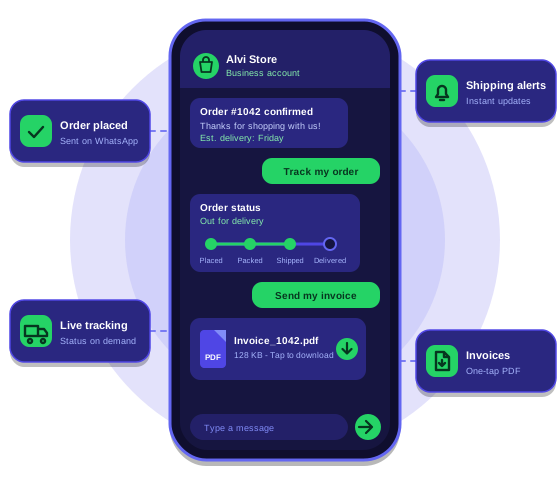
We connected an e-commerce store to WhatsApp so shoppers get confirmations and shipping updates the moment they happen. They can reply to check their order status and download their invoice without contacting support.
How we built it
Every order event becomes a WhatsApp message, and every reply gets an answer
We connected the store to the WhatsApp Business platform so order updates go out on their own, and customers can ask for tracking or an invoice in the same chat.
-
1
Listen to the store
Webhooks tell our service the moment an order is placed, paid, packed, shipped or delivered. Each event is queued, so nothing is lost when orders spike.
-
2
Match the right customer
The phone number on the order is cleaned up, checked and linked to the customer. Messages only go to people who agreed to receive them at checkout.
-
3
Send approved message templates
Each update uses a WhatsApp-approved template, filled in with the customer’s name, order number, items and tracking link.
-
4
Answer replies automatically
When a customer writes “Track my order”, the automation finds their latest order, reads its live status from the store and replies within seconds.
-
5
Deliver the invoice in the chat
A PDF invoice is generated from the order data and sent as a document, so customers can open, download and save it without searching their email.
Get updates without asking
Confirmation, shipping and delivery messages arrive as each step happens.
Check an order in one message
Customers reply with their request and see the live status straight away.
Download invoices anytime
The PDF is one reply away and stays in the chat history.
Which message goes out, and when
Store events trigger updates on their own. Customer replies trigger an instant answer.
- Order placedConfirmation with the order number, items and estimated delivery date.
- Payment receivedA short payment confirmation, so customers know the order is secured.
- Order packedA heads-up that the order is being prepared for dispatch.
- Order shippedCourier details and a tracking link.
- Out for deliveryA delivery-day alert, so someone is there to receive the parcel.
- Order deliveredDelivery confirmation and a thank-you note.
- Customer asks to trackThe latest status, pulled live from the store.
- Customer asks for an invoiceThe PDF invoice, sent as a document in the same chat.
Purple dots are store events. Green dots are customer requests.
Built to run without anyone watching
Order messages have to be right every time, so the automation guards against the usual failures.
-
No duplicate messages
Every order event is tracked, so a retry never sends the same update twice.
-
Automatic retries
If WhatsApp or the store is briefly unavailable, the message waits and is sent again instead of being dropped.
-
Consent respected
Customers who opt out stop receiving messages right away.
-
Delivery logs
Sent, delivered and read statuses are recorded, so support can see exactly what a customer received.
What it does for customers and the team
Fewer “where is my order?” questions
Customers get the answer in the chat instead of writing to support.
Updates as they happen
Every status change reaches the customer within seconds of it changing in the store.
Invoices that never get lost
The PDF stays in the chat history, one scroll away whenever it is needed.
Messages that get seen
Customers already check WhatsApp daily, so updates don’t sit unread in an inbox.
Built with
WhatsApp Business API Store webhooks Message templates Queue and retries PDF invoices Opt-in consentWant order updates that send themselves?
Automate your order updates with WhatsApp.
We design and build WhatsApp automations that connect your store, your customers and the tools your team already uses, with the checks, retries and alerts that keep them running unattended.